QQ登录

只需一步,快速开始

登录 | 注册 | 找回密码

三维网

 找回密码
 注册

QQ登录

只需一步,快速开始

展开

通知     

查看: 12701|回复: 18
收起左侧

[求助] NX I-deas 6.2m0=转档与导入均不能成功

[复制链接]
发表于 2012-4-14 11:14:01 | 显示全部楼层 |阅读模式 来自: 中国山东青岛

马上注册,结识高手,享用更多资源,轻松玩转三维网社区。

您需要 登录 才可以下载或查看,没有帐号?注册

x
win7x64, NX I-deas 6.2m0几经周折,完成安装。造型后,无法转存为其它格式。4 H' S: ?, I$ @: j3 x, n  R
导入其它图档,无法完成。1 O* o  M2 x) L. Q7 g! J! x  U% j
: a; D4 R) J& }
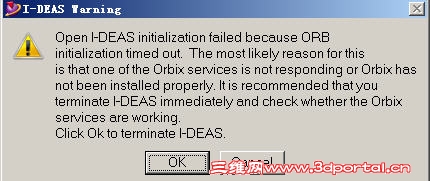
提示orbix服务不起作用....
/ r6 `3 ^; Q6 E, n
4 \4 Y; e" ^) ]% k) ^4 w) N& O不能转档,几乎就不能用啊6 a8 v' p- r  A) `
: Z( i! J: B* k: W6 ^7 O
有无解决办法?
 楼主| 发表于 2012-4-14 11:17:59 | 显示全部楼层 来自: 中国山东青岛
“The OI server is not enabled.  Please verify that the5 e$ n  G* I) I4 s3 C7 P9 \) w* l
Orbix environment is set up and configured properly.”
发表于 2012-4-14 20:39:26 | 显示全部楼层 来自: 中国江苏常州
有没有装第三方的防火墙?有的话关掉试试
 楼主| 发表于 2012-4-14 23:39:56 | 显示全部楼层 来自: 中国山东青岛
有没有装第三方的防火墙?有的话关掉试试8 T( v1 |' ]! O1 |' `
yc2006 发表于 2012-4-14 20:39 http://www.3dportal.cn/discuz/images/common/back.gif
' Q8 G/ Q2 R7 M. X
nod32........有装
 楼主| 发表于 2012-4-14 23:45:36 | 显示全部楼层 来自: 中国山东青岛
已关,仍然没用....
045.jpg
 楼主| 发表于 2012-4-15 20:56:40 | 显示全部楼层 来自: 中国山东青岛
it does not work with win7x64, only can be used with 32bit
发表于 2012-4-19 19:46:16 | 显示全部楼层 来自: 中国上海
我也用不了!!!!!!
发表于 2012-4-23 22:40:37 | 显示全部楼层 来自: 中国江苏苏州
经反复琢磨一番后,得出如下解决提示orbix问题的办法。8 w* q0 w2 f' g8 ^: W1 I, m6 m
1,在控制面板 添加或删除程序中确认已安装orbix。
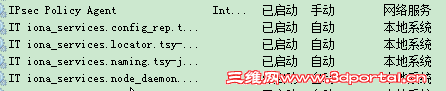
: R+ T5 h- f5 L0 S# g$ r2,右键计算机 点选管理,选择服务项 查找带有IT_IONA的四项,是否已启动,默认为手动,双击启动3 Q! Q) r  B, q# a
3,然后进入i-deas,点选 file > exprot,附件已转档为proe为例详细说明。) T* P; o+ w3 N+ A
4,本例已I-DEAS 6.2 为例,在windows xp(32 bit)和windows 7(64 bit)亲测成功。
0 M$ W+ |3 c% Z1 ]- \0 ~ I-DEAS 6.2提示orbix未安装之解决办法.pdf (223.24 KB, 下载次数: 135)
 楼主| 发表于 2012-4-25 10:05:08 | 显示全部楼层 来自: 中国山东青岛
已确认orbix已安装
/ {2 T+ q/ q: \' @  b) A服务---> 查找结果,没有IT_IONA的四项,6 w9 W1 d1 p- b# e

0 e8 ^, K; l4 I7 m: q为什么?
发表于 2012-4-25 22:05:10 | 显示全部楼层 来自: 中国江苏苏州
9# laimeng5 0 H& M1 w. X8 W3 t( B
先卸载orbix程序,后默认安装,安装时遇见i-deas选项是全部勾选。安装完毕及设置后,在点击服务项,应该可以见到。% h. p0 q; s( N  H0 z' T  ]- B
最后一招,也是没有办法的一招,那就是 重装系统后,重装i-deas,对于i-deas不管三七二一全部勾选,肯定没问题的。
发表于 2012-4-25 22:11:59 | 显示全部楼层 来自: 中国江苏苏州
这是最详细的安装I-DEAS 6.2 m0 说明
- [- u/ m6 i) V仅供参考1 p# J* \9 _- E- O
NX I-DEAS V6.2 M0 INSTALLATION5 Y" k; ]/ L+ U1 J8 n
1, in control panel delete all of these selected items:% G% b4 {; C4 o& H( S
a, I-DEAS NX series9 `1 I7 n& G) ~- v
b,I-DEAS Resource locking service  J8 k6 t# ~- _) K- \$ N0 o
c,I-DEAS SFAM component
# }# x# ]7 ^& ^9 Md,Java 2 SDK,SE V1.4.2_05
/ @4 S1 w8 g! u- Ke,orbix) R7 V- z5 d+ a$ u* U+ H% ~& ]. V
2,restart your computer
" F  M/ U- i8 ^3,Nothing related I-DEAS and java left7 w( N9 H( G& M
4,delete I-DEAS related files in windows registry, use run “regedit”1 z4 p, k9 L+ ?3 X" ~
5,begin to install I-DEAS V6.2 M0
9 c5 }9 G2 H3 x# K, [6,Do not install UGS license server
* l' q' r* K; W* z7,install i-deas nx prerquisites
! i8 ~' W7 V# W* i& VNotice:1),change the path to what you want,remember ,Chinese path not permitted.(you”d better choose the default).; U4 S* i6 s$ e. o3 q" f- f
2),if you can not install this step, you maybe reset the windows system.if your OS is the Windows 7 (64bit&32bit),you must hold the right mouse, you required the administrator permissions before you run the programs.. 8 M/ {* q- i& L3 P7 D# O. S+ k  u
8,we continue to install environment after computer is restarted.
3 F  f/ K' C4 _9,install the i-deas nx serices setup.* ?4 m, m" O5 l
9.1 install shield wizard’s dialog box comes out in design product group select this 4 items(A004 Assembly set,you can choose the all if you need)..2 X/ o; |- K  c- Z/ w6 ~0 \" ]
Select the language your OS used,if you are using an English OS,don”t need to seletct anything.(you can select the Chinese simplified and Chinese traditional.9 X( [& |2 b$ w$ }! [& A4 v
9.2 in license server’s dialog you need change the local host to your computer name.6 }' L, u' z; X4 d1 r
10, accept all the default items and finish the installment.9 a" Y" F! k7 Z5 b
11,install help if you need it* o& f# E7 }7 U- u9 L
12,exit setup9 F2 ], ]9 a( B8 p% y2 K
13, replace orginal …\lic\nxlic.dll with cracked one. Copy “nxlic.dll” to folder I-DEAS 6.2 prog dir\lic (by default c:\siemens\nxi62\lic)and overwrite orginal one.
/ C6 A( S# _# }1 C: z6 G; A14,before running i-deas run”TDI Wizard” and install i-deas resource locking service.(continue to configure the team date.)
9 ~, t4 o8 L! X0 H; N& ^5 H) KOpen TDI for mainmeau:
; _5 ~8 O9 f  I- r- HCreate and publish a teamdate installation0 g  Y1 `% `, p. F  ^
Set the team master ID:1/2/3/4 more than 1& b+ x3 q0 ^' C
Next you can default set,finish all the default option,
' S/ g9 p6 u3 q* O* M15,enjoy.4 C9 R) Y# j* o9 ~7 V9 ]
Notice:that’all. No flexlm server or license are need.* n* n( {, t* c% P- b! l& m0 M
+ L0 M; ]* o$ }" O* f; v5 k& E6 s
安装中最容易出现问题,建议重装系统后再安装。
( Z2 k# C/ G+ x" z' P1 c无法开启界面,最主要的是NX I-DEAS resource locking service 没有开启,可以在控制面板 管理工具 服务中查看,可以手动开启$ [4 S  T/ e, k, j* U! a
安装前确保磁盘文件中不包含中文。2 ^8 i2 {, x0 x  c
启动时可以右键通过管理员权限设置i-deas在起始位置中指定默认存放文件夹,默认为空白。# s( u1 o2 J5 v% ^! I
新建文件名不能包括中文及数字。
发表于 2012-4-25 22:12:37 | 显示全部楼层 来自: 中国江苏苏州
9# laimeng5 2 V& x, }* ]5 @+ N* y) I$ s
这是最详细的安装I-DEAS 6.2 m0 说明/ n9 ]! ~4 ^0 U4 D# ?
仅供参考% L6 w* a- p9 `8 n( S2 j. w
NX I-DEAS V6.2 M0 INSTALLATION3 `. j3 k; c& q" U, Z" f
1, in control panel delete all of these selected items:
3 D. w% X2 x' O, Za, I-DEAS NX series( T  A; }- n  m% M% e" ]% c
b,I-DEAS Resource locking service
% D+ N( n" p2 I  w$ Rc,I-DEAS SFAM component
& m" Y. N( _# _( ~7 K" Yd,Java 2 SDK,SE V1.4.2_05, l! B2 i! j, |7 S0 p
e,orbix
  a3 z; ~6 C* A2 T7 }2 W" t1 r; j; k, u2,restart your computer2 c% w% i; d- _: \+ S
3,Nothing related I-DEAS and java left
& Z2 g4 C4 ^6 s4,delete I-DEAS related files in windows registry, use run “regedit”2 F- W$ ]! y, z- W- b5 [
5,begin to install I-DEAS V6.2 M0
0 A/ y+ m0 m% Z# S. j6,Do not install UGS license server/ D' N4 S8 t+ S) L5 q: s5 U% `
7,install i-deas nx prerquisites$ Y2 Z% |+ S3 V/ L; C
Notice:1),change the path to what you want,remember ,Chinese path not permitted.(you”d better choose the default).
3 R1 y8 G" W- _) C2),if you can not install this step, you maybe reset the windows system.if your OS is the Windows 7 (64bit&32bit),you must hold the right mouse, you required the administrator permissions before you run the programs.. % i0 j+ c) H& K
8,we continue to install environment after computer is restarted.
0 ?# c) R& g. j; ~' D3 i* B2 P; ?9,install the i-deas nx serices setup.2 o" `" e9 Y/ f$ b& A0 c
9.1 install shield wizard’s dialog box comes out in design product group select this 4 items(A004 Assembly set,you can choose the all if you need)..
7 v, w8 i% G; |) g4 E- DSelect the language your OS used,if you are using an English OS,don”t need to seletct anything.(you can select the Chinese simplified and Chinese traditional.
* F- y% M0 n6 t. f/ ^2 z& |9.2 in license server’s dialog you need change the local host to your computer name.$ x: S' Z$ L: g( [2 O
10, accept all the default items and finish the installment.
3 D3 y* Y3 Y3 J+ ^( ?11,install help if you need it
2 u7 T3 A6 Z# a+ s  O# ?/ [2 ?/ x12,exit setup
6 Z+ }# ]/ ]0 E+ s1 D( f2 l6 G13, replace orginal …\lic\nxlic.dll with cracked one. Copy “nxlic.dll” to folder I-DEAS 6.2 prog dir\lic (by default c:\siemens\nxi62\lic)and overwrite orginal one.
: z! n4 r. L( x' k! H/ I4 J9 c- E* }14,before running i-deas run”TDI Wizard” and install i-deas resource locking service.(continue to configure the team date.)
4 R, `2 N5 U' }" M. fOpen TDI for mainmeau:  h% q' V$ X' K4 g; C2 E( `
Create and publish a teamdate installation
$ L# p( Q- ~- T# B4 x$ d6 k& ^Set the team master ID:1/2/3/4 more than 1! D: I5 D, J4 F
Next you can default set,finish all the default option,
! k. _) G# @0 H% F2 i2 }$ }: \15,enjoy.
. W5 e' m# k3 ~$ J. sNotice:that’all. No flexlm server or license are need.2 C/ }4 C) _6 O5 {2 X: a* E9 j
安装中最容易出现问题,建议重装系统后再安装。, t7 U2 I* w$ g
无法开启界面,最主要的是NX I-DEAS resource locking service 没有开启,可以在控制面板 管理工具 服务中查看,可以手动开启; Z' ?6 {8 H% @# G! n8 d! Y+ U: D
安装前确保磁盘文件中不包含中文。+ T2 m& f$ k5 e4 J* \
启动时可以右键通过管理员权限设置i-deas在起始位置中指定默认存放文件夹,默认为空白。
2 n- p7 S- r/ e0 ~" M8 Z% Q/ ~新建文件名不能包括中文及数字。
 楼主| 发表于 2012-4-26 20:27:25 | 显示全部楼层 来自: 中国山东青岛
重装系统,谈何容易,...装全估计要4-5天
发表于 2012-5-22 19:50:10 | 显示全部楼层 来自: 中国湖南娄底
大家什么看法?我先支持9 }5 ]5 I9 x2 P

; o) Y  f" Y0 J4 y( c! e3 D, }% Z5 t5 Q* f! u) N4 h
0 H: Z- f( m( V' n' R* k. v3 H( r
6 e+ T3 S* e; c
. o6 r; w  j: F9 X/ O% }7 B! w
/ {! K! @! u6 q* V1 W
: C- Q- z. L3 k/ s/ S
5 y, u& K$ d+ `' Q) f# ?0 f
) a; V9 B; l& t+ j
1 D! C% M( V7 m' r  L3 J

7 \+ @. \7 L1 N' ohttp://www.discuz.net/static/image/common/sigline.gif3 Z: }9 c, k' F/ F8 n
http://www.hfjyedu.com/办上网文凭,办医师资格证,办真毕业证
发表于 2012-5-30 22:26:25 | 显示全部楼层 来自: 中国江苏常州
nod32........有装
+ `7 ]! a  ^' p- n( i" V+ w9 d3 tlaimeng5 发表于 2012-4-14 23:39 http://www.3dportal.cn/discuz/images/common/back.gif
+ A' A) h0 \0 k% J& h$ p

; d4 I6 `7 W! L" P/ P0 Nnod32 的防火墙设置成手动模式,不要用自动模式
 楼主| 发表于 2012-6-6 21:44:28 | 显示全部楼层 来自: 中国山东青岛
9# laimeng5 8 ?7 c! L3 U+ X' t7 }/ @
这是最详细的安装I-DEAS 6.2 m0 说明
1 D: `$ J- ~0 }- n# A! O仅供参考, x2 H% t) o9 q( H+ h
NX I-DEAS V6.2 M0 INSTALLATION
- u9 f) c5 y0 \; I* V9 p1, in control panel delete all of these selected items:
& b1 T* O+ L% \& _0 Q, w) Sa, I-DEAS NX series# J2 g  [, \, z$ X
b,I-DEAS Resource locking se ...
# O, z( K: g, \  ^/ C. f& C5 ]steven0201 发表于 2012-4-25 22:12 http://www.3dportal.cn/discuz/images/common/back.gif
8 k9 n/ v; P% E5 _/ C
2 e& `" u# b' }# X
谢谢!,+ L" E7 Q& ]* a" O  v- Z  n" J
( T) L% w1 E: [- e' ~' _
没办法,重做系统,win7x64 旗舰版sp1,( Q7 v6 _; Z* O5 W
8 P! m% k* _5 t
现状1-deas 6.2m0& [/ H' H3 ^1 C9 V# \3 [
一次成功!0 `' V1 K  ]; G% y) K
快照1.png
发表于 2012-6-13 21:19:13 | 显示全部楼层 来自: 中国湖南株洲
1.首先,win7环境下,必须切换至administrator账号下才能安装。如果是安装系统后新建用户,在这个新建用户下安装i-deas后,那4个it。。。。什么的服务是没有的。如果在这种情况下,即使卸载后再切换至administrator账号后安装,也不会成功,这可能是注册表没有清理干净的原因。切记!!!
8 A) L) i3 q5 W7 m+ l2.安装成功后,i-deas必须在administrator用户下运行使用,用其他账号,启动窗口一闪而过,不能运行。
0 Q; G+ f3 O' \. @3.安装时,第一项lisence server不用安装
' `) H9 }3 s5 H7 v$ m8 D  Q5 K4.安装过程中,出现“28000@hostname”时,这个hostname不用更改,否则会出现破解失败。# M5 h# ~3 A3 }7 p- \' V2 A  N

  t0 q1 w; {* X& P5 G以上1、2两点在笔记本上遇见,在台式机上没有遇见。。所用系统皆为win7 x64
 楼主| 发表于 2012-7-16 00:48:31 | 显示全部楼层 来自: 中国山东青岛
笔记本win7 x64又不行了
发表于 2012-11-7 18:00:46 | 显示全部楼层 来自: 中国天津
你的软件在哪下的?
发表回复
您需要登录后才可以回帖 登录 | 注册

本版积分规则


Licensed Copyright © 2016-2020 http://www.3dportal.cn/ All Rights Reserved 京 ICP备13008828号

小黑屋|手机版|Archiver|三维网 ( 京ICP备2023026364号-1 )

快速回复 返回顶部 返回列表