|
|
马上注册,结识高手,享用更多资源,轻松玩转三维网社区。
您需要 登录 才可以下载或查看,没有帐号?注册

x
本帖最后由 xiaoxifeng 于 2017-3-30 15:19 编辑 $ h4 y4 U+ x1 S7 M7 H; W
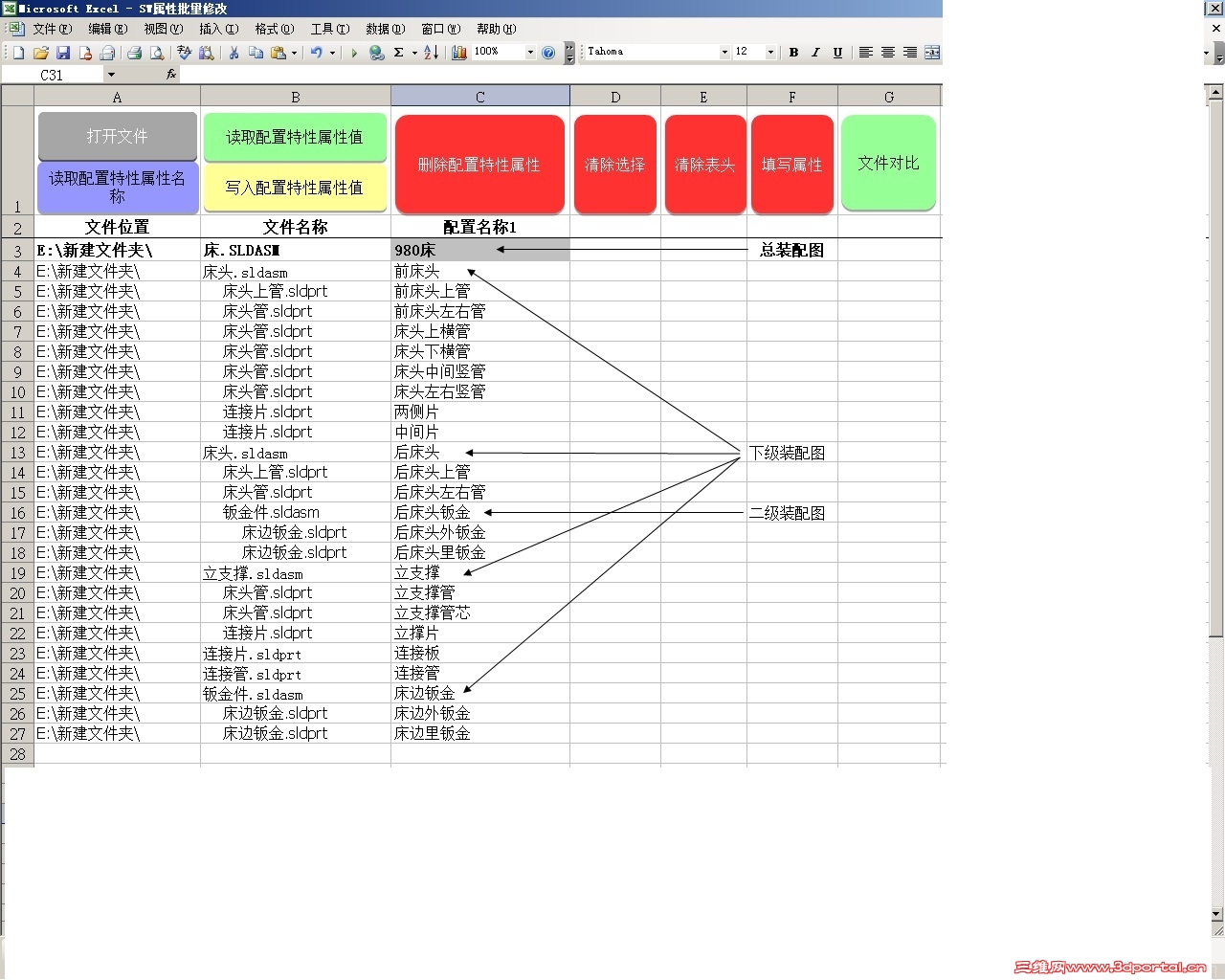
' m! T0 N4 m. f) s( p; L现在的问题是 :在下面的代码的空白处加什么代码。可以达到图片的效果。就是在打开装配体的时候,自动遍历装配下的零件和数量 并自动缩进0 o4 h5 ?5 h5 x M9 p+ |: [" X
6 \0 D/ h& b7 p$ {( \- T
! j8 L. q7 S; t1 S) {3 k: d; E3 W& p4 s1 [, H
$ N) h% g$ s( F2 O; j$ ]- Dim swDM As SwDMApplication
: t: i/ D2 I; \4 S$ G" l& H& a2 _ - Dim swDoc As SwDMDocument121 t+ M- s/ l6 ~# t& k
- Dim mOpenErrors As SwDmDocumentOpenError1 y: G5 ^4 r$ U
- Dim swCfgMgr As SwDMConfigurationMgr0 ?0 W! J: |6 c8 N( B
- Dim objClassfac As SwDMClassFactory9 }$ I: @. c3 }# s! D1 L$ u
- Dim vCustPropNameArr As Variant5 \ A9 V+ B% E& S- l
- Const SWDMLicenseKey = ""' a: I6 m1 U- Z* b' t
- ; m! V }6 o: ]9 a7 S1 t B" w
! a, U0 f1 d+ @( w% q- Sub 打开文件()
0 a1 x+ N" I1 @! @' y$ S R - Range("A3").Activate
3 T9 s/ B: X. d$ F$ N- c - Set objClassfac = CreateObject("SwDocumentMgr.SwDMClassFactory")
6 k' b. z) U8 h7 t0 A+ i - Set swDM = objClassfac.GetApplication(SWDMLicenseKey) '啟動SWDM
9 B0 O% g/ h0 q - Dim vCfgNameArr As Object" O( b: p% G: |# {2 I; j
- Dim vCfgName As Object0 O3 v/ Y2 p5 Y% k# j
- Dim swCfg As SwDMConfiguration '14
* z2 @# T5 e% Y+ A; m) Q - Dim nPropType As Long
% A8 U: E4 q; U, F' T2 G - Dim PropList() As String1 Q0 h$ F( k5 V8 Z4 ]* `
- ReDim PropList(0)
+ M/ B* D/ n" w - PropList(0) = ""8 m- J: B* G1 L1 I* S! b3 m) z
- Dim intChoice As Integer
$ J8 f0 t+ E! K! {. @ - Dim FilePathName As String& d. ^- [4 Y) K7 {* n9 Z
- Dim i As Integer
$ ]" }' d+ t, E. W - HeaderRow = 20 ^! M# j! |7 U) O% o
- RowNumber = 3* a4 Q5 i# k" s) v+ O% R
- PathName = Cells(RowNumber, 1) '讀取第一個路徑的值
6 i! C* f8 T* }8 R2 K) W - While Not (PathName = "" Or PathName = 0 Or IsEmpty(PathName)) '直到讀完路徑欄(尋找繼續填寫的位置)3 q' C/ U) g+ m+ @
- RowNumber = RowNumber + 1 '下一列+ J/ f v7 i& M" E3 y9 i
- PathName = Cells(RowNumber, 1)
3 A6 n0 l+ Z" C+ h9 D! A6 K# E - Wend '回到>直到讀完路徑欄
+ n4 Y5 C/ K( N, |, b, m- i) D( b) p - Application.FileDialog(msoFileDialogFilePicker).AllowMultiSelect = True '設定為多選對話框. }6 @0 T0 H+ ]" F
- Application.FileDialog(msoFileDialogFilePicker).Filters.Clear '清除既有類型
1 j2 m1 R G$ V/ L$ j! a7 o - Application.FileDialog(msoFileDialogFilePicker).Filters.Add "零件自定义属性", "*.SLDPRT" '設定檔案類型/ S" G y" J6 _, u6 n8 `
- Application.FileDialog(msoFileDialogFilePicker).Filters.Add "零件配置属性", "*.SLDPRT" '設定檔案類型( i/ R; W. p2 o1 e
- Application.FileDialog(msoFileDialogFilePicker).Filters.Add "装配体自定义属性", "*.SLDASM" '設定檔案類型
/ y& ?/ Z% J5 u' P - Application.FileDialog(msoFileDialogFilePicker).Filters.Add "装配体配置属性", "*.SLDASM" '設定檔案類型6 n9 |4 `% I. C9 t3 F' q. y
- Application.FileDialog(msoFileDialogFilePicker).Filters.Add "工程图属性", "*.SLDDRW" '設定檔案類型
9 Z0 p. D5 p1 [ - If Cells(1, 1) = 1 Or Cells(1, 1) = 2 Or Cells(1, 1) = 3 Or Cells(1, 1) = 4 Or Cells(1, 1) = 5 Then
4 l* Y- r2 E' I# Q - Application.FileDialog(msoFileDialogFilePicker).FilterIndex = Cells(1, 1)
2 g! A0 C5 q G2 J8 I - End If& c) C2 y. R$ |9 R% f
- If Cells(1, 2) <> "" Then Application.FileDialog(msoFileDialogFilePicker).InitialFileName = Cells(1, 2)
7 }, t$ z8 n! t" @# n. w& T5 ^ - intChoice = Application.FileDialog(msoFileDialogFilePicker).Show '彈出對話框4 U" t0 W1 b! h) {
/ y6 o3 h) E1 P; ]/ r( T- If intChoice <> 0 Then '判斷有否點選檔案2 ]' ^, U3 w) h2 s. O" M) t
- RowCount = 1
9 T* V6 N# P! N j" d" G( ? - swFilterIndex = Application.FileDialog(msoFileDialogFilePicker).FilterIndex% a E0 q& _, r7 D- n
- For i = 1 To Application.FileDialog(msoFileDialogFilePicker).SelectedItems.Count '逐一讀取所選檔案
; q2 t2 B1 U {4 f. U$ k- e - FilePathName = Application.FileDialog(msoFileDialogFilePicker).SelectedItems(i) '讀取完整檔案名稱
/ x* |0 Z8 Z4 S# K - FilePath = Left(FilePathName, InStrRev(FilePathName, "")) '分解路徑7 D3 L$ N; J. J' I
- FileName = Right(FilePathName, Len(FilePathName) - Len(FilePath)) '分解檔案名稱# O7 F0 r. N/ n. Q4 A% `8 b
- FileExtname = UCase(Right(FilePathName, 6)) '分解檔案類型
. L7 O- Q6 B& U8 U% B - If swFilterIndex = 1 Or swFilterIndex = 3 Or swFilterIndex = 5 Then
" {+ N. O8 a9 M3 j" c! D# q - Cells(RowCount + RowNumber - 1, 1) = FilePath '填寫路徑
4 D( p- q; @( _) S) s - Cells(RowCount + RowNumber - 1, 2) = FileName '填寫檔案名稱
! ~5 y- a/ K* L3 ~( n1 h# J6 E9 p# N - RowCount = RowCount + 1
* N1 ^* Y' i8 }: }# c: ~ - End If) b. A& y$ n6 T `& ?
- If swFilterIndex = 2 Or swFilterIndex = 4 Then '過濾器是2或4- N( @$ n+ K& G# q
- Set swDoc = swDM.GetDocument(PathName & FileName, swFileTYpe, False, mOpenErrors) '開啟檔案, l L h/ H$ p4 T; t9 n. Y; c: f
- If Not swDoc Is Nothing Then '排除無效檔案
1 L: q& t1 F/ T8 ~/ b - Set swCfgMgr = swDoc.ConfigurationManager5 z5 b; s$ z' v5 {, H
- swConfigNames = swCfgMgr.GetConfigurationNames7 I" k$ t* i- m0 Y7 C! C
- + h5 i( s! f! g+ P! I+ k+ g9 x
- For Each swConfigName In swConfigNames
( p3 q c$ y6 r! b - Set swCfg = swCfgMgr.GetConfigurationByName(swConfigName)
- x m) B: W8 m3 h. M" M3 V1 y - vCustPropNameArr = swCfg.GetCustomPropertyNames/ c' K. I" ]# ]1 k
- If TypeName(vCustPropNameArr) = "String()" Then) h& ?" ~; J& {% [! D# R( a
- & a6 q" N/ }' o: _7 ~' ]
- , M1 l' t8 u* w9 S
- 9 S: s1 Z9 m% X* v" h& P. k
- ' K, [6 h/ U* f. N8 n2 Z* `1 g
- $ o) X1 f c. ~' k% d3 ], U
3 L+ A; H0 [' W( M% w, ?/ v/ o- 4 `+ n; ?8 b; ~, X9 e/ f4 j
/ u) L. y# Q6 K3 Z, ?) j* }
3 d) H! c% c) E8 I
$ P1 A% I9 v7 P) c4 `, b- End If
9 O8 D/ k; _3 _6 c( a - Cells(RowCount + RowNumber - 1, 1) = FilePath '填寫路徑. G. a. x4 P$ \; ?
- Cells(RowCount + RowNumber - 1, 2) = FileName '填寫檔案名稱. ]; e Z& A3 F; E% A$ o* i
- Cells(RowCount + RowNumber - 1, 3) = swConfigName '填寫模型組態名稱
& E8 Q; S( L O% N% F - Cells(RowCount + RowNumber - 1, 3).Interior.Color = RGB(200, 200, 200). F# N. M. G0 ?6 C* K
- , E; k% ]8 p/ n+ v1 C; Q5 ?
- RowCount = RowCount + 1; A( b+ t. P7 ?/ n
- Next
( s3 \* |) h X2 l% g8 v - swDoc.CloseDoc '關閉檔案9 X5 B8 h3 j4 a3 f q( t
- End If '排除無效檔案<完>! P L+ O5 g( o3 t T
- End If ''過濾器是2或4<完>
/ R2 h# ^" U0 G" Z4 e$ G - Next i '逐一讀取所選檔案<完>
" X2 L* k Y# f5 C$ c. c3 v - End If '判斷有否點選檔案<完>7 M6 ]6 H4 ?% g) M2 ]; y. w! H
- End Sub
! x# r6 q5 M5 ~" r: ~! ]
5 R5 `- p: A0 q
^) ?& ?& [# B+ ?, S) |* R |
-
|







 发表于 2017-3-30 15:18:45