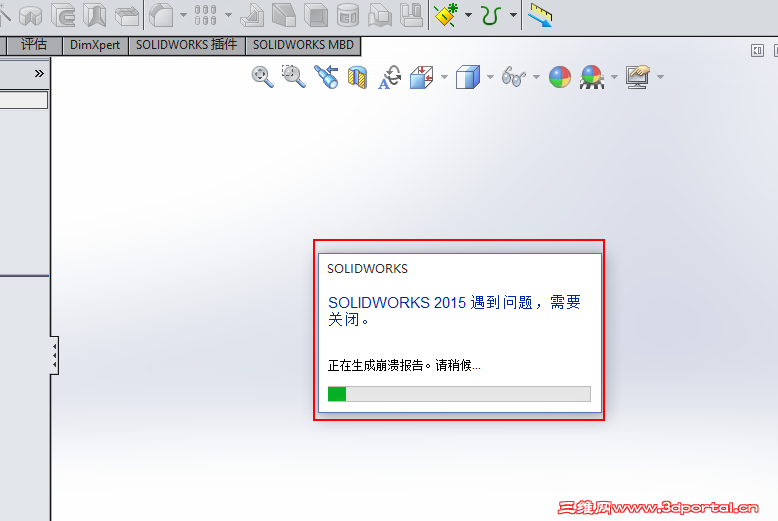
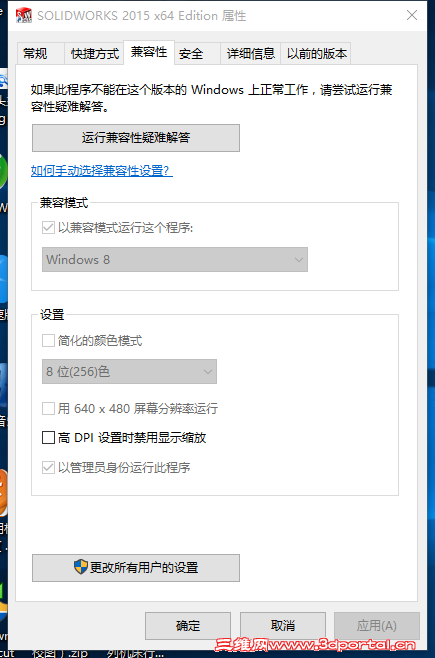
Solidworks官方论坛也有人提到这个问题(用菜单的打开或另存为会出现崩溃),解决的办法也是采用Windows 兼容模式运行Solidworks. 他说双击SW打开文件不会崩溃。保存打开的文件也不会崩溃。但如果用另存为的话,会崩溃。) J! o0 P; n/ w; A+ q
Is anyone else experiencing SW2015 SP4 crashing for "Open" "Save" or "Save as" from The File menu? Double-clicking on SW files will open as expected without crashes. Saving a file that's already open and clicking "Save" works as expected without crashes, but as soon as I "Save as," it crashes. / k' G2 j& b2 U+ D0 y. j! \I'm running SW in Windows 8 compatibility mode to get past this issue for now. I hope this gets resolved. Reproduced on two other computers running Windows 10 build 10240" I Q0 W( B. j+ P! s0 N w2 `) \
* Q3 ]4 z/ V2 u+ v/ n$ y
! ?2 a# Z I5 T# q+ Y' f* J6 _- d
7月29日,Solidworks官方发布了支持Windows 10的公告:+ \ a, Z- }' p
Jul 29, 2015 # R0 x$ O" U! TSOLIDWORKS Support for Windows 10 + @1 j9 A W& X- J- c
% Z* X4 ~( ?% N5 x2 }. _
SOLIDWORKS products will support Windows 10 64-bit Pro and Enterprise in SOLIDWORKS 2015 and SOLIDWORKS 2016. A future announcement will give details of the specific Service Pack for both SOLIDWORKS 2015 and SOLIDWORKS 2016 commencement of support. SOLIDWORKS 2014 will not support Windows 103 g: I" L ?/ C
SolidWorks产品将支持Windows10的64位专业版和企业版(在SolidWorks2015和2016)。SOLIDWORKS后面的公告将会给出SOLIDWORKS 2015和Solidworks2016特别服务包开始支持的详细信息。SOLIDWORKS 2014 将不支持 Windows10。








 发表于 2015-7-27 09:11:24
 楼主
楼主


 发表于 2015-7-29 08:03:00
