- 积分
- 748
UID7132
主题
在线时间 小时
注册时间2006-1-25
|

楼主 |
发表于 2007-5-22 20:26:39
|
显示全部楼层
来自: 中国山东临沂
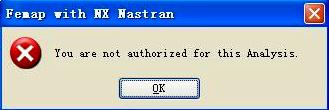
那麻烦你了,能用正版是很幸福的事。可惜了那些只能用学习版的人。附一个学习版的安装说明吧,但没搞懂。安装以后里面也没有UGFlexlm文件夹。
& ?& h* w# H6 S8 n2 S+ O) o6 v( I7 {6 I' H
UGS_FEMAP_V9.2-LND:* I2 @* R, ?8 r$ h5 E2 o3 \! n) s
-=-=-=-=-=-=-=-=-=-=-
j5 g0 @ \" m$ c2 q. l, D) | q! N5 ]* }; B
1) run setup and select the setup type "Network License Server" and
9 a* Q# k+ G- c/ j4 V C, h) U' O select all options.: S5 n5 e: r/ f& j
1 I8 m3 s/ B, s, G f2) open the femap.dat and change 000000000000 to your computer hostid. Run kegen.bat and copy the license.dat to e.g. C:\FEMAP92.
% F# m/ Y$ u6 k9 s2 T9 R$ j* K7 ^; z& p& i C
3) For NX Nastran .
# \* w2 |( B1 |# c" [8 {" t+ S ~' m2 B7 S+ N( D8 i5 a' y
a) open the ugnx4.lic and change host to your computer name.
$ @! C3 }5 s) B7 r0 H. T. b2 k b) copy the ugnx4.lic to e.g. C:\FEMAP92\UGFlexlm.
6 ^3 M7 ?% G8 Q2 q- D c) manually setup Flexlm services within C:\FEMAP92\UGFlexlm
# {/ ]2 E. v# d) ` directory.
8 W- i0 ]& G0 K4 ?( o7 C d) set the license environment: LM_LICENSE_FILE = 27000@host' e4 U2 }: {8 `1 N7 U* P! N! I3 |; A
e) go to c:\femap92\nastran\conf folder and open nast4.rcf file and
) y6 p! G, j, W U2 D" A& X change program = femap to program = ent' f# l# a) i" j+ I
6 q! U" v! X$ V9 v" @1 h
6) enjoy another fine LEGEND-release! |
|








 发表于 2007-5-20 21:54:05
 ,在此表示万分的感谢!
 good
good