|
|

楼主 |
发表于 2014-11-2 11:49:30
|
显示全部楼层
来自: 中国北京
搞定个简单版。
) L0 Q9 u" n+ v1 Q需要做成 宏 的按钮来用才会比较方便。
5 n y- J/ C8 |1 g8 h功能:打开BOM表里所选单元格对应的模型的工程图,如果没有工程图不做任何提示。
% M# t( }, K& O6 g5 o$ r* E2 M特点:支持 多选! 选几个打开几个!: E$ C7 ~+ F: s- K- [
BUG: 不能 选行! 只可以选单元格,不限制单元格里选那一列。' z, S7 c% i% v7 N0 Y" z
不足:暂时不支持配置。
5 i; B% v8 r9 M9 a
2 k5 Y7 \2 B* S* j1 o7 v, L" W8 U* }( ^/ |5 w7 J1 W5 H
Dim swApp As SldWorks.SldWorks
, e5 E4 |2 `& vSub main()
1 g8 f2 c+ h+ [8 {0 n Dim swModel As SldWorks.ModelDoc28 w7 @) p# O5 f0 H1 M. c/ _$ g
Dim swSelectionMgr As SldWorks.SelectionMgr S) d& O' L4 k" a
Dim swDrawing As SldWorks.DrawingDoc: |1 \9 ?8 n( Y; w& z% }
Dim swAnnotation As SldWorks.Annotation$ P* y% Y' T1 }# v/ c
Dim swTableAnnotation As SldWorks.TableAnnotation. W2 M; F& b1 v# f
Dim firstRow As Long
9 T I- x+ I! x% g% k6 Z( n& P2 U Dim lastRow As Long
K: X7 ]# h* l, J1 s3 ]# F; X) b Dim firstColumn As Long, |6 }; _+ _! R7 @4 Y$ R0 a
Dim lastColumn As Long
5 v2 t2 Q2 u; h* H4 Y Dim idx As Long$ `* g; l. ` |
Dim vModelPathName As Variant
R& s D3 t4 N# d Dim vModelPathNames As Variant' @ v% C* d4 r+ j
Dim strItemNumber As String! @7 Q& U) Q: P E2 ^
Dim strPartNumber As String% m7 h3 h( e* e$ m' S" U
Dim ModelName As String) a" X7 p$ A3 N# I% x4 d
Dim DocName As String) V _3 g# G/ Z. a: F
+ S N. E2 e4 v4 Z4 r5 c. n9 E# c# A
) X' ^5 k1 i6 V. U5 ~" ~( {2 n4 z Set swApp = Application.SldWorks9 S. N% g: t$ d: S/ D/ t0 c
Set swModel = swApp.ActiveDoc
+ }9 w# {9 t! A1 m Set swSelectionMgr = swModel.SelectionManager
4 N5 [' B( V2 A7 P Set swDrawing = swModel) `. T$ ]7 `$ M8 D; t3 i
6 h% N7 o0 t( Z& b4 { For idx = 1 To swSelectionMgr.GetSelectedObjectCount2(-1)3 d6 M2 k7 ]# `
Set swTableAnnotation = swSelectionMgr.GetSelectedObject6(idx, -1)* e0 k' _, m- E# k
Set swAnnotation = swTableAnnotation.GetAnnotation* x! m1 X( b4 g. f" @/ w
swTableAnnotation.GetCellRange firstRow, lastRow, firstColumn, lastColumn' j2 X1 J" o+ u* J9 W7 z
vModelPathNames = swTableAnnotation.GetModelPathNames(firstRow, strItemNumber, strPartNumber)1 U. A2 @! G$ g" B' }3 j
ModelName = vModelPathNames(0) h) u0 ]9 e5 ]: G
DocName = Left(ModelName, Len(ModelName) - 6) & "SLDDRW"
7 H5 ~' w2 [, e' u* q
0 f9 d/ O* y. g5 x' X) @! c1 C o 'Debug.Print "First selected cell's row = " & firstRow. W) ]" ~* P" J9 G# N/ L
'Debug.Print "Last selected cell's row = " & lastRow
0 d$ x- D8 w2 `. `! A5 i/ t 'Debug.Print "First selected cell's column = " & firstColumn; }: `" l5 y3 V, n) F0 |
'Debug.Print "Last selected cell's column = " & lastColumn
( y8 |* s6 c; Z- } 'Debug.Print ""
a. t2 }% M% U5 Y' L 'Debug.Print "First selected cell's row = " & firstRow, strItemNumber, strPartNumber
2 N* s- Q) y& }+ z( Y7 l 'Debug.Print "First selected cell's row = " & ModelName/ z" B; Y' e9 e
'Debug.Print "First selected cell's row = " & DocName
$ k, z5 |. v8 y# }; y/ ~- r( X; R'---------------------------------------------------------------7 b: S9 ^" l: G. s6 |+ H6 E |
Dim swApp1 As SldWorks.SldWorks5 q# }+ v8 m! w, Y+ p
Dim doc1 As SldWorks.ModelDoc2
. y+ L' u: ^% F7 s# W4 sDim fileerror As Long
, |6 s3 A% Y4 X7 b D5 L6 yDim filewarning As Long3 t- Y: r4 b3 I( E$ N2 u- K
2 N+ m( K1 `, _Set swApp1 = Application.SldWorks7 H! n- d" G3 Y* s0 U% y- N
swApp1.Visible = True
& F( t) B K6 Z# lSet doc1 = swApp.OpenDoc6(DocName, swDocDRAWING, swOpenDocOptions_LoadModel, "", fileerror, filewarning)2 t( Q) O' K7 E2 i
5 }! E2 |2 T2 ^, `5 Y+ ['---------------------------------------------------------------/ N7 E. r4 F( |' c) Z7 d; s: Q
0 F2 l8 w; F: R$ Q4 ?1 E& B
. N; ^" z8 }6 n$ _
1 X2 S# m+ r! V8 E* |9 m1 z Next idx- O& h8 a0 m6 \$ N
If (firstRow = -1) Then9 g3 T7 Y: X$ Q v
Debug.Print "Selected entire table!"
}* b" y5 M# \8 r* K$ H End If1 s( O( T5 J6 m) a( o
- _9 Z. J/ {1 K- T# o( p) _' c swModel.ClearSelection2 True7 H+ U% F. X! \2 u6 d+ Q
End Sub1 n, Y8 x, l+ o
|
|








 发表于 2014-10-30 14:46:10
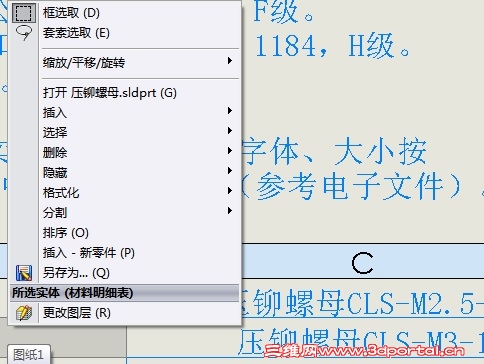
 楼主自己开发一个吧,