|
|
马上注册,结识高手,享用更多资源,轻松玩转三维网社区。
您需要 登录 才可以下载或查看,没有帐号?注册

x
本帖最后由 gopc 于 2015-9-23 21:45 编辑 3 ]3 L1 v1 N4 ^$ R( T
% V( s5 @' a( Y2 rX6多功能自選後處理-三菱/FANUC切換/含剛性攻牙代帶啄攻/G05.1/換刀前加入N碼
0 r C, F5 W( Z2 [1 K使用方法請解壓縮檔案後會有兩個檔,然後用文字編輯器開啟 MPFAN.pst ,修改你要用的參數
2 e, l! p2 F/ Z: G# |9 i' U4 F. G+ O" n) ]: d; N. M
依照您使用的機台,大致上只要修改有中文的地方...就行了
: r$ C7 M5 l! c& E/ m8 g1 W7 S- B! K
) s$ t4 w% L0 a- ! C8 W5 Z9 E/ n2 ^, t" k! J- W3 H4 E; q
- stagetool : 1 #SET_BY_CD 0 = 不備刀, 1 = 備刀
7 ] o8 s4 D4 \+ `% H( c, R - ) q' ~& I5 ]( i$ ~0 Z: P
- tool_info : 1 #Output tooltable information?
5 B, e# n+ `- a k# f, \ - #0 = Off - Do not output any tool comments or tooltable
4 i8 h7 k- U# p) L6 i - #1 = Tool comments only 刀具資訊,顯示在每支刀後面
2 Z3 S0 C3 d8 N8 i6 W9 \* ]" }* m" b - #2 = Tooltable in header - no tool comments at T/C 刀具資訊,顯示在最上面
1 u) f+ R5 e$ Y. k& a/ D - #3 = Tooltable in header - with tool comments at T/C 刀具資訊,最上面/每支刀後都顯示. _5 `2 U; ^& g' q( I% U" p
- - Z$ b& C1 `4 S- \! s
3 |. C& V" D- e* G* ~ U8 s0 Z- fstrsel sm09 coolant$ scoolant 4 -16 |9 ?* c9 u; x3 }* e4 v5 d
- # --------------------------------------------------------------------------/ f7 K- V \9 O& e2 ~" L" s
- # Coolant output code selection for X style coolant
& T* O1 T7 n# H" ?* Y - # Note: To enable X style coolant, click on the General Machine Parameters icon, R% n4 p" {9 q1 [* z
- # in the Machine Definition Manager, Coolant tab, disable first check box/ Z1 g% `& Y; \- ~! ^
- # Output of X style coolant commands in this post is controlled by pcan, pcan1, & pcan29 @0 C# f" [ V
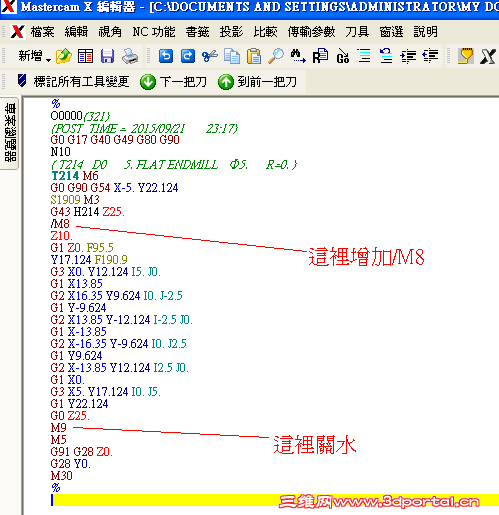
- scool50 : "M8" #Coolant 1 on value
) e5 B- a! G/ U7 c4 b- I! s2 V& O W - scool51 : "M9" #Coolant 1 off value9 H( m% h7 L; D: r$ i# L; r
- scool52 : "M7" #Coolant 2 on value 吹氣開FANUC用M14 三菱用M7- ]; ~' L& K4 q# e4 g
- scool53 : "M9" #Coolant 2 off value 吹氣關FANUC用 M15 三菱用M9
; C q1 T' r' ?. m/ C8 Z' l0 @8 e - 3 p1 W2 X& T& G, Q) Z
- ( d5 F k) \( d6 F9 w) I
- fmt "P" 11 dwell[ DISCUZ_CODE_1 ]nbsp; #Dwell 移除停留時間後的小數點fmt "P" 將 11改成 fmt "T" 一樣
; K2 K$ Z, s1 O0 }$ [" L" c/ p
4 t% W, Z$ G6 o& p; F4 ~1 I- # -------------------攻牙顯示方式設定------------------------------------------ # Z/ Q* B1 u9 u5 E
- tap_feedtype : 0 #0 = 攻牙顯示方式 FANUC F值=轉數X牙距=進給
. V. h: H" B) ` - #1 = 三菱 F值=牙距
( E$ M0 p& ?! j3 A! [0 w% g - & e( Z) l) V6 W5 X" H
- # -------------------刀號/刀長/刀徑補正設定------------------------------------------ ' J _* f$ ^1 x6 c
- tool_H_D : 1 #0 表示刀徑補正=刀長補正=刀號,刀具資料不顯示刀徑/刀長補正3 o! a! u9 l8 v4 g5 t5 B0 c2 B
- #1 表示刀長補正=刀號,刀具資料不顯示刀長補正
& N2 N7 |+ t5 A7 V - " a& n! G1 _( O' r, f3 {! H
- # ----------------- 程式開始前的自定義代碼-例如:加入/M98 P705-------------------------------------------------------+ V& | u! m7 U [/ a! H& p
- CODE_N : 0 #0 不顯示(無自定義代碼,請選0)! x: d2 H- p8 y4 h/ n# x
- #1 顯示
; G, W ?$ O: i$ O% D$ z - Scode : "/M98 P705" #可以設定自定義代碼字串(" "雙引號中的字串 可以改): ?7 R% n" C5 ~/ V- i
-
$ J7 R( v% F3 s) u/ P5 r# q
4 _" j/ P6 w& ?( c4 a- # ----------------- 開啟高速高精度加工AICC G05.1Q-------------------------------------------------------
; m8 t+ V+ }. Z& W9 X3 z6 R+ i" j - Saicc_N : 0 #0 關閉AICC
( G0 Y( d. h4 r% \( M - #1 開啟! e6 O, O" w4 E h2 s# O+ G# n
- Saicc_0 : "G05.1Q0"
9 \- b" b2 l+ _2 _8 ] z n - Saicc_1 : "G05.1Q1"- q" Y: v( q& m* `: z
- % m" `: l& K$ v/ r
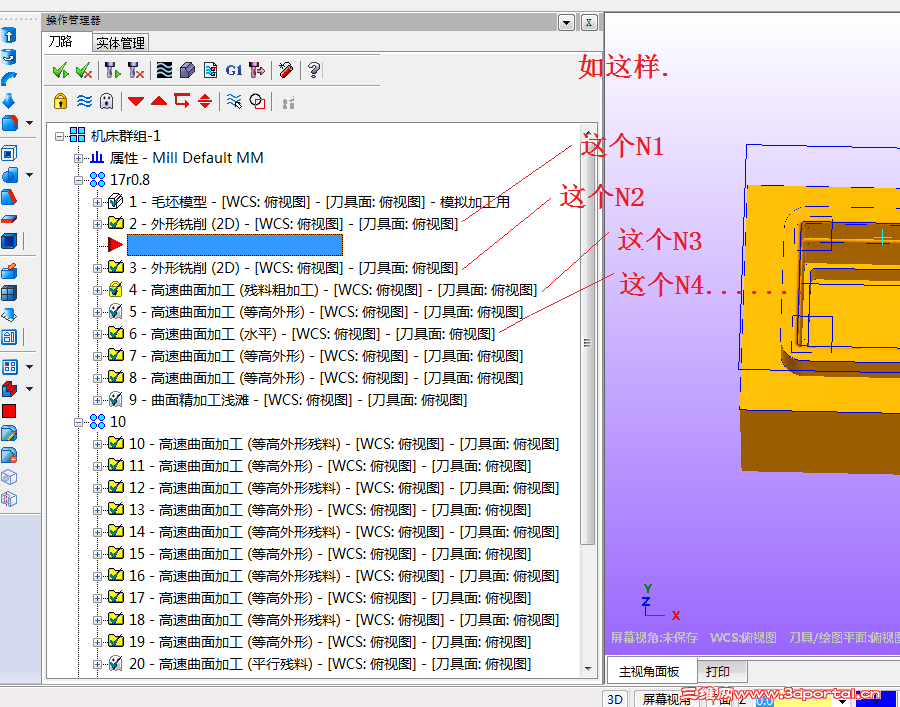
- # -----------------換刀前加入行號N--------------------------------------------------------: V% R! `$ B: c! @
- tool_N : 0 #0 不顯示* C' Q6 I. W0 G
- #1 顯示
9 a& j8 v0 d4 F" y - strgoto_N : 1 #參數開始值,N1,N10 ^# Y3 V- B1 Y& J: C: Z( N; F
- strgoto_add : 1 #參數增加值,N1,N2,N3或N11,N21,N31
! Y; W+ C( E/ e# `! ~2 o5 p# |1 ?
# A Z4 c2 @9 S
然後複製到C:\Users\Public\Documents\shared mcamx6\mill\Posts 下...就可使用
/ D. N1 `; F; A. e; b {- w
* X4 o/ \3 f7 H; w繁體7 f' ?5 Y4 J2 `* ?
 MPFAN-X6-TW 20150913.rar
(62.72 KB, 下载次数: 18)
MPFAN-X6-TW 20150913.rar
(62.72 KB, 下载次数: 18)
|
|







 发表于 2015-9-21 18:13:34

 楼主
楼主 7 l3 y% n) X# L4 z6 D