|
|
 发表于 2010-3-8 17:16:28
|
显示全部楼层
发表于 2010-3-8 17:16:28
|
显示全部楼层
来自: 中国四川成都
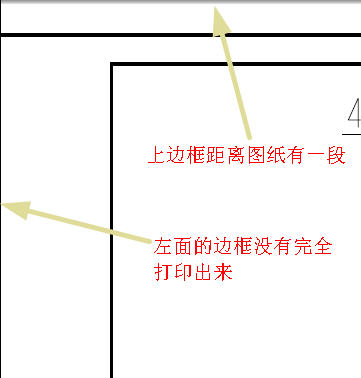
关于打印出来没有边框,要詷整一下PCF文件里面的参数。打印的时候直接选择你自己的PCF文件的打印配置就可以了。以下是我的PCF文件,你可以参考调整一下:修改为你自己的:( h# R; d6 E& W
plotter ms_print_mgr
! U5 R, D1 g' V$ Q ?, `button_name leegune_A4) p6 q# t; J4 N9 h& u& O0 Y
button_help print using windows printer manager
( y; L9 u: S* N! H3 P9 cplot_handshake software default. s1 |0 g5 `& @# B8 E
allow_file_naming yes- k7 e# M w& K1 X- V/ |/ ]( O
delete_after_plotting no
$ o8 U) w6 _+ B* R4 Q/ yinterface_quality 3
( G6 x6 L) m$ x: C. Tplot_destination printer default
# \. U- R$ _8 m* Upaper_size A42 f6 ]( T" ]- ^! w8 u
pen_slew 15
( C8 i2 U6 u0 h0 wpen_table_file f:\ptc\standard\plot_config\leegune.pnt
" f" M3 L+ k2 h `: F5 J6 tplot_sheets current
. K' Q/ |9 u# [! t- ~plot_access create
o2 x, ]" S; r/ ^) }) Y/ J0 Yplot_clip no8 I$ B1 t, t0 J9 I+ W
plot_drawing_format yes
; s. d4 J; P) Zplot_label no
4 d( ]. S" k( f5 h5 eplot_layer current; n; o* i8 X$ X- f: j4 ]. O
plot_linestyle_scale .25: i* ?- e$ w$ [7 s7 m+ X( @' N( C
plot_names no
$ c. m5 B5 O" ]8 q. F$ c- O( ^0 Nplot_segmented no; {0 V9 Q, x( y+ e
plotter_command windows_print_manager
* x5 Z _. |( |* p2 [' @plot_scale fit_paper
* |* E* X0 d6 f: W. U& qplot_translate 0.236220 0.236220 default) k o) G: {% |: N7 V
plot_scale PLOT 0.990000 default3 E6 ^5 F- ~* L9 n9 A% q/ i9 p' t
" a) u2 E$ K& U3 L3 d! O!===========edit by leegune 2004.10.19==============! |
|







 楼主
楼主