|
|

楼主 |
发表于 2015-5-12 17:00:18
|
显示全部楼层
来自: 美国
阶段性的总结一下、希望对后来者有帮助:
0 N5 v: K0 E7 w5 q8 o, j7 q: A9 Q" d2 b _$ b3 S& f: b" m% J
网友wumatao和wuzhijian分享的经验:另存一下,似乎会减小文件大小,不妨试试$ S; H. |6 L8 N' O& U1 o8 b# g
【我验证过、很有效、装配体文件大小可以从几百M变成1.9M】
/ D6 F' u) e5 F' c5 b: H% k2 f% O0 }1 N) [+ s+ v
7 A, j5 V9 f8 V另外、后来在网上看到一些遇到相同问题的讨论:
3 P0 [0 I* {& S5 m' O+ ?2 @, O1 I- q5 J- H
————————tdx99
$ s+ G7 K: v1 o- o* b' x; X; L! z# pHello All,
0 Z, H$ Z# G) Y# c d! @; M8 z2 Q8 f; M5 ^
I was asked to look into an issue with apart that an engineer designed. The saved part is + n+ K M! l( q- n) M$ {) I
85megs! The part hasabout 100 features. One of my part with about the same number of
4 W: [# P# Y- r! cfeatures is less then10 megs. Both the engineer and Iare fairly new to SW so I couldn't
. X! A& U$ }+ @4 Lfigure out what the problem was.All features weremade from simple extrusions, cuts,
0 c- c# S# f8 J6 l8 D8 Vpatterns, chamfers, rounds. No complicated surfaces and not drafted yet. I did notice that 4 g F2 M/ j: a/ g
a lot of the extrusion and cut features were created as thins./ B5 J, T; h' s1 j9 I
% d: ]' n# y1 I( R6 HI would hate to have to recreate the part.8 _0 N% T" B" E. W4 `6 |4 ~" T# n
& D) b3 n0 M- x! `6 b5 h
Any help would be appreciated.0 [4 ]0 k( |+ p2 i V+ Y0 F
s6 k$ y+ t2 s4 ?
Thank you,
/ F, G2 F. O" `! T: C' I" P6 ^ D" n0 Q# x. F* m
——————————Metoo
5 i, _% U$ R2 l3 W2 e8 `! m1 n5 hThis is a problem in Solidworks; two people can design the same identical part and the two
9 t; n$ o" I1 a8 G) L! epart file sizes can vary widely. If one made lots of changes; rebuilt his model numerous ! F1 }- n4 K0 P+ m p) X
times withmoved features in the tree; added and removed constraints, modified scetches, + E- V) h, Y6 d. D r2 A0 b
etc, etc..., that file will grow and grow and grow. 2 V/ z: P) F5 Q- Y- o3 n) u m3 p
# H! s1 l2 d4 C
Here's the question - do you really need the feature tree? If its a simple part, then its 10 -
/ b& X& v0 I1 t; Y. f" J6 T6 v& T( X15 minutes to redo. If its a complex part, then the feature tree is worthless anyway; save it
2 i* {1 c& Z: G, A$ Lout as an iges or parasolid and bring it back in as dumb surface/solid. If you need to make
" t$ U! ~1 D6 Q/ [1 l" R7 `4 ]changes to it afterwards, then cut off what isn't needed and add what is. There's nothing 2 O N8 d8 e: v( H* y6 N
mystical or magical about having a feature history with a part model./ A# X# Z/ [; F# S% q; }1 l
/ i2 H0 X0 ?5 E% j% f: X6 Y4 m5 E——————————tdx99
9 |6 _7 E& ^: P M' b- q: gThanks for shedding some light on the problem. We had a design review and quite a few + |! G, m- J& ]7 a$ O' o: o
changes were made. Now the file is over 140meg. It takes about a minute to save the darn . ?; Z5 {2 } M& n! S s
part now. Is there any way to purge.. or trim the fat off of this thing? It is getting to the 7 E& u9 o7 Y9 k1 v% @& Y
point where it would be better to recreate the part.
3 q$ Y* h4 I6 Y& ~) }% O: j: \! J% ^0 t7 T
——————————Meto" ~" g4 G% i* q, g2 H/ ]
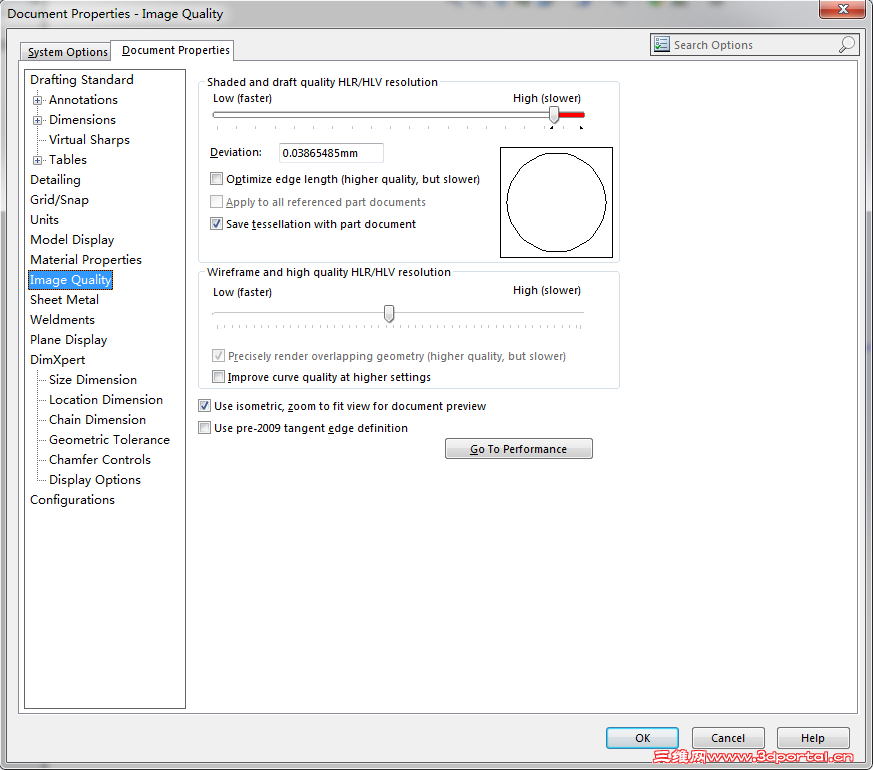
First; get rid of all the fluff; studio, lighting, background graphics; all the stuff that has 6 h! ^7 D7 [. a( a4 L3 B
nothing to do with the part design. Go to your file options, and check the graphics display
% B! P( L$ }2 G% {5 }: {. F9 `resolution to be sure it isn't unreasonably set high, as well as associated setting. When all
9 @' e; |, d- E- `# O) Velse fails, remodel the part.* a+ y; j: A# |
4 N j2 {1 i9 Y7 Y! q- V
I have noticed that similar files have exhibited a size reduction when opened and saved in
8 N+ W1 s/ m, F- [) b! unext higher version of Solidworks. This recently happened when the company I was
, ?0 k9 v& p) q; P8 k; Y; Bcontracting for moved from 2007 to 2008.A mold part I was working onsaved in 2008 at " N1 ]# u- `# h& r
about half the size as in 2007. That filealso had numerous changes to it, and I was about , b: b9 R* Q6 E' b8 J5 G6 ~* s
to save it out as a parasolid and bring it back in as a dumb model to reduce the size of ) a0 W9 w; L& K$ K/ q4 @ x6 C. h; U
assembly file before I noticed the part size dropped from about 100 meg to about 55 meg.: t5 Y/ p" J! b8 a; Q
) m; E! P2 P$ O/ @
——————————ProE_Addict2 {& w1 W- A7 J$ y
I don't recommend "saving out and bring it back in as dumb geometry." At that point 7 }* r4 t0 L* s. t5 W
you've just spent a lot of time creating your masterpiece only to destroy thebeauty of the
7 R$ H2 q d. Sparametric software.: s* l. N" t/ V. L1 X
1 |+ {- a1 L. MIf you can, do a File, Save As. This usually does the trick. I believe SW saves a lot of history & y# M3 k: g% U/ k) O3 d# `
data within each file. When you do a Save As, that history goes bye-bye and you start fresh.
! z0 e; L7 h7 N/ ?8 R8 F
9 B d# m6 d1 n# n——————————FireWild/ d/ V& Z2 j% B0 }
I had this same problem with a Solid Works Part a few months ago I tried the save as trick / m6 j3 w. U" ~' e/ l5 w0 R+ K
and it did not work I even sent it in to Support and they were not able to figure it out either. For the record I've never had this problem with a Pro-e part.
' e: H5 i) o$ m& n& h. U
3 [1 j }) `( I- C* J. q4 f) \2 _——————————michael31300 H, {+ _" C, x: O
Yes, absolutely you need the feature tree." @( S: e) s8 ~; G" G( J
$ s/ V7 \( G: eIf its a complicated part, the feature tree is worthless if you don't know how to model a
# e$ J* W' Q P& j3 R8 t9 y Wpart properly. Seeting out a plan from the start to build your part, anticipating as best you i1 w; ]" g/ ?' K5 g' M
can changes that may occur in the future and through past experience, a complicated part
# E4 ?9 F$ `" S' Y& ucan be adjusted from the very 1st feature very successfully. It very much comes down to
: `3 P: Y6 s7 v& Q, ~* g. \% Dthe skill of the CAD user and this is one of the areas that makes the difference between ( w9 Z% S# i# K3 {: e
someone who says they can use a 3D CAD package and someone who can actually use it.
2 {$ f% ~6 W5 R* }+ O6 O5 g! M0 h8 \
If the tree was useless, there would be no posts from users on this forum looking for " p7 Q% I. {1 ], K* }
workarounds to the problem of saving to an earlier version of the software. Though as I'm ' s8 Y- y) `( I4 }( \
sure you will see if you look that there are many.
2 y X5 D/ u: S# E: R: k& H6 l1 ^, W* f$ l7 u
|
|








 发表于 2015-5-9 19:26:56
 发表于 2015-5-11 10:55:02
 欢迎发表~~8 f1 i8 }: ^- k) \ o
 、覆盖上一个 另存为......
 发表于 2015-5-13 20:09:48
